TL;DR: Single-page applications ship their entire frontend codebase to every visitor, including unauthenticated ones. Even a login page with no visible functionality delivers JavaScript bundles containing route definitions, API endpoint URLs, authentication logic, data models, and sometimes hardcoded secrets. As part of Guard’s continuous penetration testing, we use AI-assisted tooling to extract this information and fuzz the backend APIs it reveals, finding IDORs, unauthenticated endpoints, and exposed backend services that bypass API Gateway authentication. On the automation side, Guard crawls every external web application across a customer’s attack surface, runs Titus to detect and validate embedded secrets, and we are currently building a system named Cato for automated triage of these findings using artificial intelligence at scale.
A few weeks ago I was working through a list of web applications on a client’s attack surface as part of Guard’s continuous penetration testing. One of them loaded a login page. No sign-up link. No documentation. No visible functionality beyond a username field, a password field, and a submit button. A traditional scanner would poke at the login form, try some default credentials, and move on.
I didn’t move on. That login page was a single-page application, and the browser had just downloaded the entire frontend codebase to render it. I opened DevTools, pulled the webpack bundle, and pointed Claude Code at it. Within a few minutes it had mapped out route definitions for every page in the application, extracted API endpoint URLs for multiple backend services, identified the authentication logic including token handling and refresh flows, and surfaced data models that described what the application stores and processes. The login page presented itself as a dead end. The JavaScript bundle it shipped told a completely different story.
This post covers why SPAs are an underappreciated source of reconnaissance data during external penetration tests, how I’ve been using AI agents to automate that analysis, and how this ties into the tooling we’ve built at Praetorian to detect secrets in frontend code at scale.
What Do JavaScript Bundles Expose in Single-Page Applications?
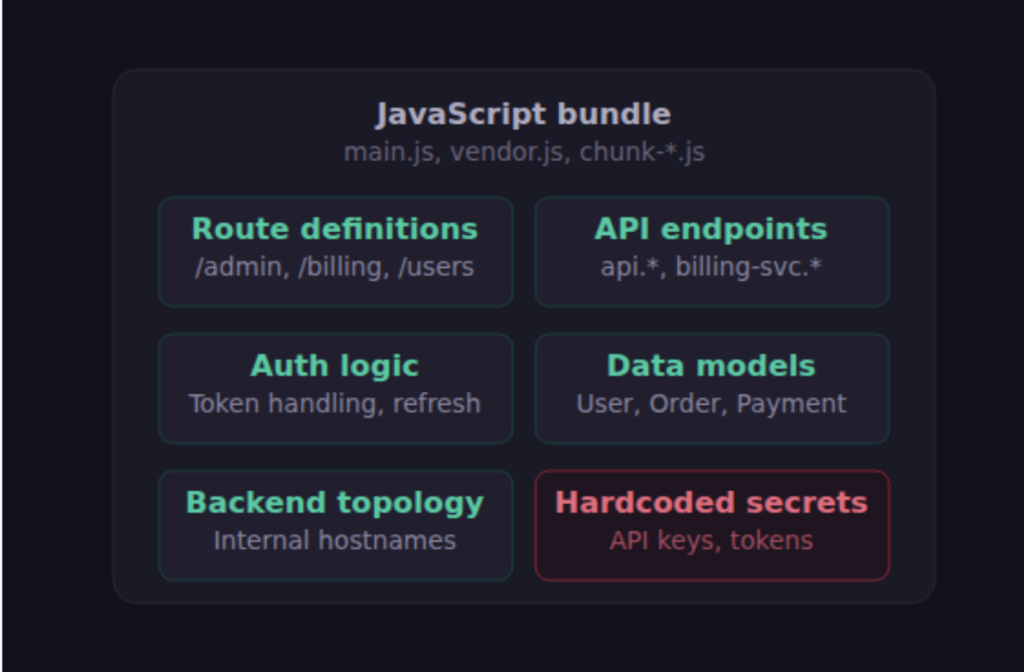
If you’ve done web application security testing, you probably already know this at some level, but it’s worth being explicit about the scope of the problem. Modern frontend frameworks like React, Vue, and Angular compile application source code into bundled JavaScript files that the browser downloads and executes. The specific bundler varies (webpack, Vite, Rollup, esbuild, Parcel, Turbopack) but the result is the same: one or more JS files that contain the full application codebase. These bundles are minified and sometimes obfuscated, but they are not encrypted. They have to be readable by the browser, which means they are readable by anyone with a browser.
A JavaScript bundle for a typical enterprise SPA might contain dozens of route definitions mapping URL paths to components. Each of those components makes API calls, and those API calls reference backend endpoints by URL. Even a login page that displays nothing but two input fields is backed by a bundle that imports the router configuration for the entire application. The admin panel, the user management dashboard, the billing integration, the internal reporting tool: all of their frontend logic ships to every visitor, regardless of whether they are authenticated.
This is not a bug in any particular bundler or a misconfiguration by the developer. It is the fundamental architecture of single-page applications. Server-side rendering avoids this by only sending the HTML for the current page, but SPAs trade that property for the responsiveness of client-side routing. The tradeoff is well understood in web development, but the security implications are routinely underestimated.
Using AI Agents to Analyze SPA Frontend Code
Manually deconstructing a minified JavaScript bundle is tedious but not difficult. Tools like source-map-explorer and browser DevTools can unpack and display bundle contents in a readable format. What made this interesting for me was realizing that AI agents can automate the entire pipeline and then keep going.
Guard combines human security engineers with AI-assisted tooling, and this is one of the areas where that combination pays off. My workflow has been straightforward. I find a SPA on a client’s attack surface, point Claude Code at it, and tell it to analyze the frontend. Claude downloads the JavaScript bundles, extracts the route definitions and API endpoint URLs, maps out the backend services the application communicates with, and then starts fuzzing. I’m typically looking for endpoints that don’t enforce authentication, authorization vulnerabilities like IDORs where one user can access another user’s resources, and backend services that are reachable directly from the Internet without going through the application’s intended authentication layer.
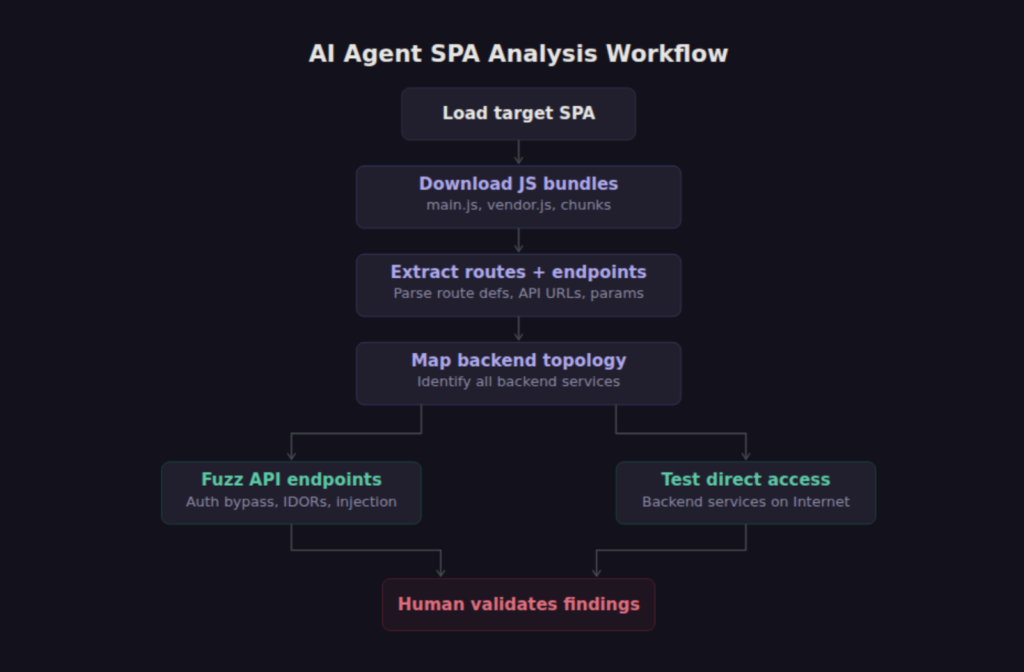
What makes a model like Claude Opus 4.6 effective here compared to traditional fuzzing tools is the contextual reasoning. Claude can look at a frontend helper function that constructs a request to /api/v1/users/{id}/documents and understand that the {id} parameter is worth enumerating, that the endpoint probably returns user-specific data, and that testing with sequential or predictable IDs is the right first move. It can interpret error responses, adjust its approach when it hits rate limiting, and follow the chain when one discovery leads to another.
The agent can also reason about relationships between what it finds. If the frontend calls api.example.com, billing-service.example.com, and analytics.internal.example.com, the agent can map the full backend topology from a single page load. Some of those services may be exposed to the Internet with no authentication of their own, relying entirely on the frontend to gate access. We have documented this exact pattern across multiple customer environments: the SPA enforced authentication at the frontend layer while the backend API served data to anyone who knew the URL format.
How a 500 Error Revealed an Unauthenticated Lambda Function
One discovery from this approach is worth walking through in detail because it illustrates why the error handling path matters as much as the happy path.
I had Claude fuzzing an API that sat behind an API Gateway. The application’s frontend had given us the endpoint structure, and Claude was methodically testing each endpoint for authentication enforcement and parameter handling. During one round of requests, Claude sent a payload that caused the endpoint to return a 500 error. That’s not unusual. What was unusual was the error response: it included a stack trace that revealed the hostname of the underlying Lambda function.
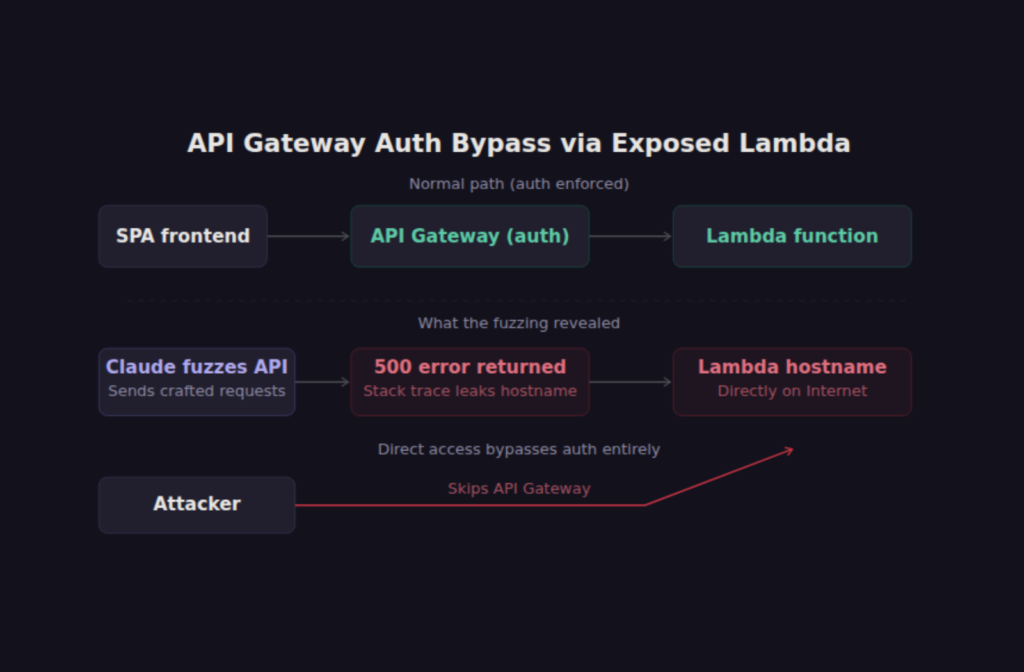
That hostname was directly reachable from the Internet. The API Gateway enforced authentication. The Lambda function behind it did not. Hitting the Lambda URL directly bypassed the authentication layer entirely. What started as a JavaScript bundle analysis turned into unauthenticated access to the backend service. The application’s developers had correctly configured authentication at the API Gateway level but never considered that the compute layer behind it was independently addressable and lacked its own authentication.
You may be wondering how common this pattern is. In my experience, it’s disturbingly common in serverless and microservices architectures. The frontend talks to an API Gateway, the Gateway proxies to a Lambda or container, and somewhere in that chain someone assumed that a layer further up was handling authentication. An AI agent that can fuzz its way through that stack and interpret the error messages it receives is remarkably good at finding these gaps.
Why AI-Assisted Development Is Making the Secrets Problem Worse
Hardcoded secrets in frontend code are not a new problem, but the scale is changing. The rise of AI-assisted development has dramatically lowered the barrier to building and deploying custom web applications. LLMs are good at producing functional frontend code quickly. They are less reliably good at handling secrets management correctly. An LLM generating a React application will happily hardcode an API key in the source if the developer’s prompt includes it, and many developers who are new to frontend development don’t realize that client-side JavaScript is visible to every visitor.
The result is a growing population of custom-built SPAs deployed to the Internet with embedded credentials that their developers never intended to expose. These are not just toy applications. We see this pattern in production business tools, customer portals, and internal dashboards that were “only supposed to be used internally” but ended up on the public Internet.
Manually reviewing JavaScript bundles for secrets across hundreds or thousands of web applications is not practical. But a scanner that crawls every exposed web application in a customer’s attack surface, extracts and analyzes the frontend code, and flags embedded credentials can surface findings that would otherwise go undetected until an attacker found them first.
Detecting Frontend Secrets at Scale with Titus and Guard
The AI-assisted workflow I described above is effective for targeted analysis, but it’s one side of the platform. The other side is automation that runs continuously against every external web application in a customer’s attack surface without a human driving it.
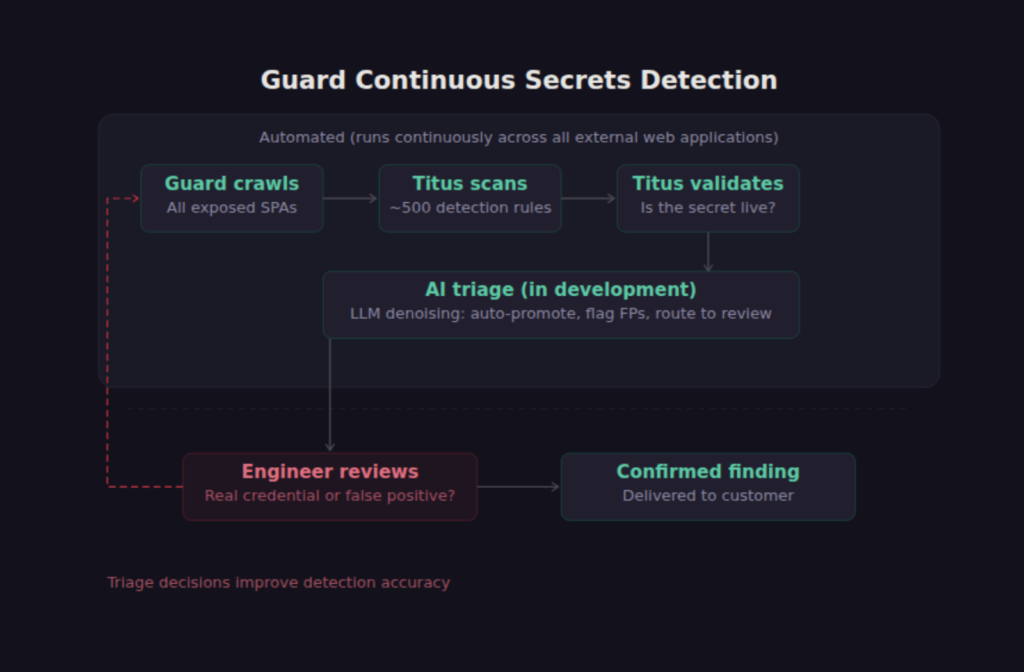
Guard crawls all exposed web applications across a customer’s environment as part of its attack surface management and continuous penetration testing capabilities. When Guard encounters a SPA, it doesn’t just note that a login page exists. It pulls the JavaScript bundles, runs Titus against them, and flags any embedded credentials. Titus is our open-source secrets scanner that ships with nearly 500 detection rules and runs as a CLI, a Go library, a Burp Suite extension, or a Chrome browser extension. When Titus flags a credential, it can validate whether that secret is live by making a controlled request against the relevant API, so you know immediately whether the finding is actionable.
We’re also building out an AI-driven triage layer that will automate the denoising and prioritization of secrets findings within the platform. Regex-based scanners inevitably produce false positives from test fixtures, example configs, and placeholder values that happen to match a pattern. Titus’s validation framework catches some of these (a test AWS key won’t return a 200 from the STS API), but not all.
Our focus is on feeding each finding’s surrounding context into an LLM to determine whether it looks like a real credential or noise, and routes findings accordingly: auto-promote confirmed secrets, flag likely false positives, and surface borderline cases for human review. This is currently being prototyped in the platform.
Why Human Validation Still Matters
One thing worth being explicit about is that the AI agent approach works best with a human in the loop. LLMs are good at contextual analysis and can fuzz APIs far more creatively than traditional tools, but they also hallucinate. I’ve had Claude confidently report that it found an IDOR vulnerability when the data it accessed was actually public and intended to be accessible by any user. It confused “unauthenticated” with “unauthorized” because the API returned data without a Bearer token, but the data was a public product catalog, not user-specific records.
This is the kind of mistake that would generate a false positive finding in a report and erode client trust if it went unreviewed. The value of the human-plus-AI model is that the AI agent can cover ground that would take a human days or weeks to traverse manually, while the human validates that the findings are real, assesses actual business impact, and understands the context well enough to know whether “this endpoint returns data without authentication” is a critical IDOR or a public API working as designed.
Guard is built around this principle. The automated scanning and AI-assisted analysis surfaces candidates. The security engineers working the account validate them, assess impact, and deliver findings that are real. The two sides compound: automation gives the humans better coverage, and the humans’ triage decisions feed back into the platform’s detection logic to improve future accuracy.
How to Protect Your SPA Frontend Code
If you are building SPAs, the most important thing you can do is assume that your entire frontend codebase is public. Every route, every API endpoint URL, every data model, and every string literal in your JavaScript bundle is visible to anyone who visits your application. Design your backend security accordingly.
That means authentication and authorization enforcement on every backend endpoint, not just the ones you expect users to reach through the UI. It means keeping secrets out of client-side code entirely and using server-side proxies or backend-for-frontend patterns to handle API keys and service credentials. And if you’re running serverless or microservices architectures, it means verifying that every layer in the stack enforces its own authentication independently rather than trusting that an upstream gateway is handling it.
If you are responsible for an organization’s external attack surface, consider how many SPAs are deployed across your environment and whether anyone has looked at what their frontend bundles contain. We have consistently found that organizations underestimate both the number of exposed web applications in their environment and the amount of sensitive information those applications ship to the browser.