Everyone knows that one person on the team who’s inexplicably lucky, the one who stumbles upon a random vulnerability seemingly by chance. A few days ago, my coworker Michael Weber was telling me about a friend like this who, on a recent penetration test, pressed the shift key five times at an RDP login screen and discovered the system had the sticky keys backdoor configured, giving him unauthenticated remote code execution as NT AUTHORITY\SYSTEM. This post covers how we built automated RDP sticky keys backdoor detection into Brutus, our open-source credential testing tool.
I figured this would be an incredibly rare find, something only ever configured by a malicious attacker. But after talking to Michael and doing some research, I realized this configuration is far more common than expected. My coworker Zach Grace actually researched this back in 2015, in his Hunting Sticky Keys Backdoors research, Zach scanned 10,000 internet-facing RDP hosts sourced from Shodan (out of approximately 5.1 million services on port 3389 at the time) and found 11 sticky keys and utilman backdoors, suggesting roughly 1 in 1,000 exposed RDP servers on the Internet had this backdoor configured. A 2018 study by Nicolas Heiniger at Compass Security found even higher numbers, scanning 9,450 Swiss RDP hosts from Shodan. He discovered 113 backdoored systems, putting the rate closer to 1 in 100.
Zach in turn pointed me to an excellent DEF CON 24 talk by Dennis Maldonado and Tim McGuffin titled Sticky Keys To The Kingdom: Pre-Auth RCE and a companion tool called Sticky-Keys-Slayer that automated the detection process. At this point I was hooked on the vulnerability class and wanted to build out a capability to automate identifying this issue. I had specific reasons for building my own implementation rather than leveraging the sticky keys slayer tool, which I’ll get into later in this post.
The timing worked out perfectly. Recently we released Brutus, a modernized replacement for Hydra designed to automate the discovery of weak or compromised credentials within an environment. RDP support was already on the roadmap but had been deferred from the initial release due to some implementation challenges. Since I needed to add RDP credential testing to Brutus anyway, adding sticky keys backdoor detection alongside it was a natural extension.
Why Wasn’t RDP Included in the Initial Release?
As part of our initial work on Brutus we actually developed a plugin with support for the RDP protocol. It worked great during our initial testing using open source rdp server implementations like xrdp. Unfortunately, when we did further testing we later realized it didn’t work properly against modern Windows Server implementations that enforced protocol features like network-level authentication (NLA).
Another key challenge we ran into in this scenario was that none of the remote desktop protocol client-implementation libraries that we encountered in Go actually worked properly even against less complex targets like open source remote desktop servers. To solve this we instead leveraged CGO to statically link against the rdp-rs library written in Rust using the foreign function interface (FFI) functionality to link Go code with Rust code through a CGO-based interface.
Linking Rust directly with Go code worked pretty decently as it still functioned to build a statically linked binary, but it introduced complex build dependencies and made it difficult to build the tool outside of a docker container or CI/CD workflow. If a user tried to passively import the tool as a library or “go install” the tool it would fail with a confusing error message.
Unfortunately, once we started testing our implementation against targets running Windows Server we realized that the rds-rs library we used also didn’t support network level authentication (NLA). Additionally, it really complicated the build process and made installation annoying so we decided to just remove the implementation to simplify things and then revisit things later.
What are common root-causes of the Sticky Keys Vulnerability?
The sticky keys backdoor (MITRE ATT&CK T1546.008) is a classic persistence technique where sethc.exe (the accessibility helper) is replaced with cmd.exe. Since Sticky Keys triggers from the login screen via five Shift key presses, and runs as NT AUTHORITY\SYSTEM, this grants unauthenticated SYSTEM access to anyone who can reach the RDP port. While the technique is simple, the reasons these backdoors exist in production environments are varied.
Adversarial Persistence
Nation-state actors and ransomware operators frequently use this as a low-tech, high-reliability persistence mechanism. CISA’s 2020 advisory on the Iranian threat group Pioneer Kitten (UNC757) documented the group using the sticky keys backdoor as part of their post-compromise toolkit. Similarly, MITRE cites groups like APT29 and APT41 leveraging accessibility features to maintain access. Ransomware operators also deploy this mechanism to re-enter compromised systems for negotiation, even if defenders reset all domain credentials.
Administrative Workarounds & Shadow IT
Perhaps the most common source of this vulnerability in internal networks is actually system administrators. For years, a common “break-glass” procedure for recovering a system with a forgotten local admin password has been to boot into the Windows Recovery Environment, swap sethc.exe for cmd.exe, and use the shell to reset the password. The problem is that the backdoor often doesn’t get cleaned up afterward, leaving the system permanently vulnerable.
Vulnerable Pre-Authentication Software
A less obvious but critical root cause is third-party software designed to run on the Windows Secure Desktop (the login screen). To function before a user logs in, applications like VPN clients, accessibility suites, and self-service password reset tools must run with SYSTEM privileges. If these applications contain vulnerabilities, or even just poor configuration, they effectively become a “Sticky Keys” backdoor by default.
For example, on several engagements I’ve encountered custom or third-party software exposed on the lock screen for tasks like password resets or VPN connectivity. In one specific scenario, I identified a password reset mechanism that allowed me to break out of the intended window and execute code as NT AUTHORITY\SYSTEM, granting full remote code execution on every system within the customer environment.
In 2022, I published research on CVE-2022-0016, a remote code execution vulnerability in the GlobalProtect VPN client. The flaw existed in the “Connect Before Logon” feature, which spawned an embedded browser on the Windows login screen. Much like the classic sethc.exe replacement, this exposed complex, vulnerable functionality before the user had authenticated. By exploiting this, an attacker could escape the intended UI and spawn a SYSTEM command prompt, achieving the exact same outcome as a Sticky Keys backdoor without ever touching a binary on disk.
Lack of Network Level Authentication
Regardless of whether the cause is a malicious file replacement or a vulnerable VPN client, the enabler is the absence of Network Level Authentication (NLA). This is often flagged in Nessus as “Terminal Services Doesn’t Use Network Level Authentication (NLA) Only” (Plugin ID 58453).
Without NLA, the server initiates a full, resource-intensive graphical session (the “WinLogon” desktop) for anyone who connects, effectively exposing the Windows lock screen to the entire internet. NLA forces the client to prove their identity via CredSSP before the server ever spends resources spinning up that graphical session.
Brainstorming Different Solutions to the Library Problem
I’ve been interested in finding different ways to leverage WebAssembly on red team engagements since watching Joe DeMesy’s excellent Offensive WASM presentation. DeMesy provides some really cool examples of how WASM can be used offensively, for example, he demonstrates compiling a Python interpreter to run in WASM and executing it entirely in-memory via a virtual filesystem (36:38). He also highlights other powerful TTPs like dynamic C2 traffic encoding (23:42) and running .NET tools without the CLR to evade EDR (33:34). There are also some interesting use-cases for WASM on the defensive side; for example, Firefox leverages WASM to sandbox legacy C libraries likely to contain memory corruption vulnerabilities using their RLBox tool.
As mentioned previously, we decided to hold off on shipping the rdp functionality in Brutus due to being unable to find a decent pure Go library we could leverage for this functionality. However, we kept finding decent libraries written in C and Rust (e.g. IronRDP) with good support for the RDP protocol, but couldn’t really find anything in Go that we were happy with. Initially I wanted to task an LLM to port IronRDP into Go so I could use it as a library directly. I’ve found this is one area where LLMs are fairly effective as long as you provide it with the correct skills, specifications, and tests. While I’ve had success with doing this with other tools and capabilities in the past porting Python code to Go, I knew that in this case given the complexity of the RDP protocol there would likely still be a significant number of bugs and edge cases that would need to be fixed.
However, I also thought of another idea which would be to leverage WebAssembly to compile an existing library like IronRDP to WASM and then embed the compiled WASM file within Brutus itself. This would allow us to leverage the IronRDP within Brutus without introducing any complex build dependencies that would break things like the “go install” workflow. After considering both options, I decided that WASM would likely be the safer bet in this scenario and decided to take this route within the implementation.
Embedding IronRDP into Brute Using WebAssembly
We architected the solution by embedding a Rust-compiled WebAssembly module for IronRDP directly into the Go binary, eliminating the need for CGO or external shared libraries. In this design, the Rust module functions as a purely functional, I/O-free state machine that handles all complex protocol logic, including X.224 negotiation, CredSSP sequencing, etc. while Go manages the network I/O, TLS handshakes, and connection lifecycle. The two components communicate via a simple loop where Go feeds network data into the WASM module and executes the returned instructions. This ensures that the Rust logic remains sandboxed and platform-independent, while Go retains full control over socket management and timeouts.
From a performance perspective, we found that the WebAssembly overhead is effectively negligible when compared to the inherent latency of the RDP protocol itself. RDP Network Level Authentication (NLA) is an incredibly “chatty” sequence, requiring nearly ten sequential network round trips just to verify a single credential. Because the protocol spends the vast majority of its time waiting on network packets to travel back and forth, the minor processing overhead added by the WASM execution is completely lost in the noise of network latency. We utilized the wazero runtime to maintain a pure Go dependency tree, and while this approach slightly increased the final binary size, it was a worthwhile trade-off to gain a stable, cross-platform RDP implementation without the maintenance burden of a manual port.
Implementing Sticky Keys Backdoor Detection Automation
To implement sticky keys detection, we built two separate modes that work as complementary layers. The first is a fully local heuristic pixel analysis that compares a baseline bitmap of the RDP login screen against a second bitmap captured after sending five Shift key scancodes, if a rectangular region of significantly changed pixels appears (the telltale sign of a cmd.exe or PowerShell window popping up), the heuristic flags it as a likely backdoor based on the region’s size, fill ratio, and pixel delta.
The second mode is an optional AI-assisted confirmation layer that, when enabled via the –experimental-ai flag, sends the response bitmap to Claude’s Vision API to visually identify whether a terminal window is present, this catches edge cases the heuristic might miss, like custom shells or unusual window configurations, and provides a higher-confidence verdict.
Why Automate This?
The natural question is why build this when tools like Sticky-Keys-Slayer already exist and manual testing is straightforward. For manual testing, the answer is scale, on an internal assessment with thousands of RDP endpoints, nobody is manually connecting to each one and pressing Shift five times. Sticky-Keys-Slayer solves the automation problem but it’s a bash script with multiple external dependencies, making it cumbersome to integrate into cross-platform workflows. Brutus ships as a single statically-linked binary, so adding sticky keys detection is as simple as appending –sticky-keys to a command you’re already running.
Exploitation Quality of Life Features
One of the annoying things about exploiting sticky keys backdoors is that once you’ve identified one, actually interacting with it can be surprisingly painful. You may need to install an RDP client on your attack box, deal with X11 forwarding if you’re working from a headless system, or figure out how to route your RDP client through a jump box to reach an internal target.
Brutus solves this with a built-in browser-based RDP client. When you identify a vulnerable instance, passing –sticky-keys-web launches an embedded RDP session accessible from any web browser, no RDP client installation required. Add –sticky-keys-open and Brutus will automatically open your default browser directly to the session. This is especially useful on internal engagements where you’re operating through a jump box: run Brutus with –sticky-keys-web on the jump box, set up an SSH port forward, and you can interact with the SYSTEM shell from your local browser without ever needing an RDP client on either end.

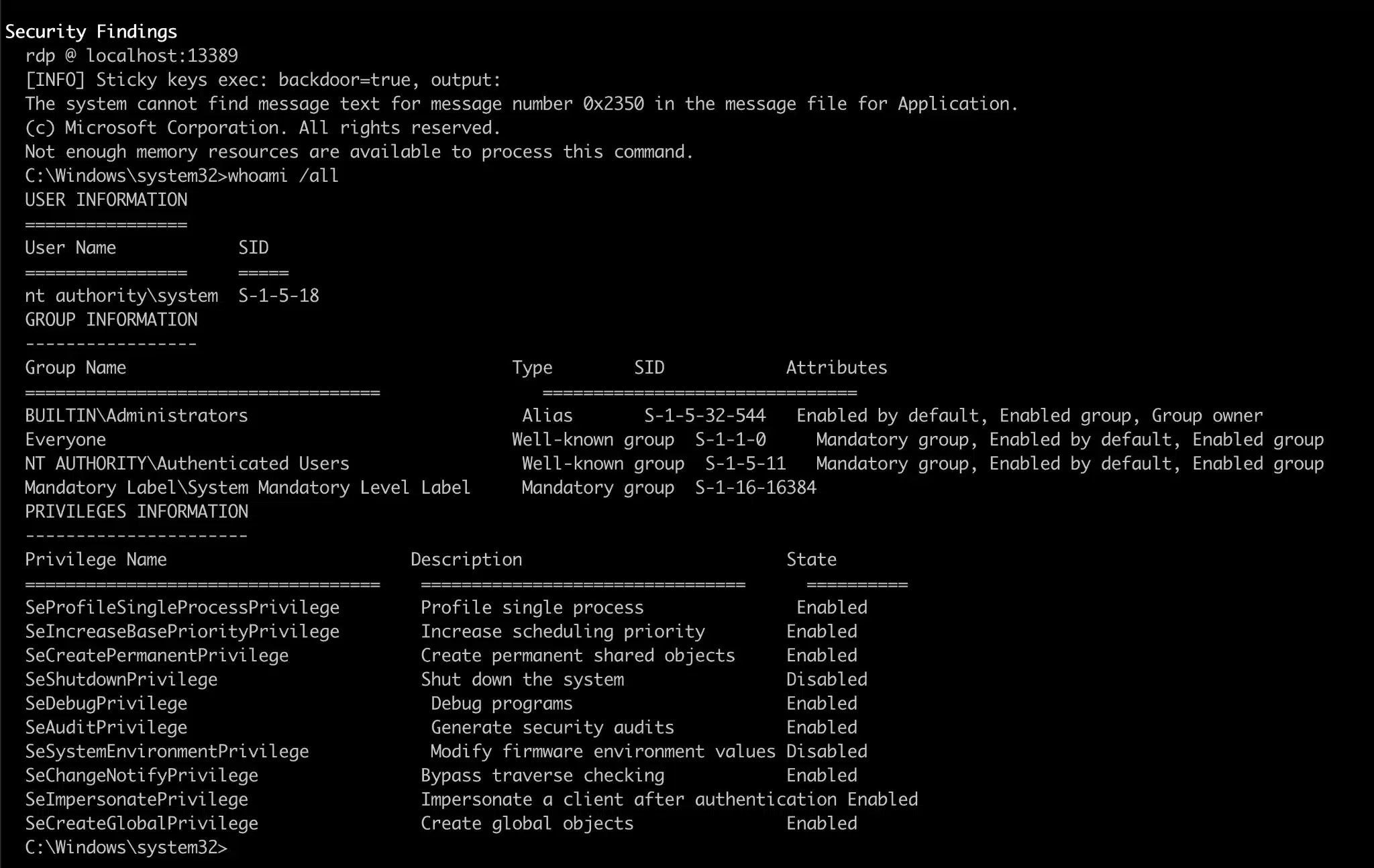
We’ve also added the ability to automatically exploit the backdoor and extract command output without ever opening a graphical RDP session. When you pass –sticky-keys-exec “whoami /all” alongside the –experimental-ai flag, Brutus triggers the sticky keys backdoor, types the specified command into the resulting shell, captures the screen output as a bitmap, and then uses Claude’s Vision API to OCR the terminal contents back into structured text. This means you can go from discovery to confirmed SYSTEM-level code execution in a single pipeline step.
Brutus connects, triggers the backdoor, runs your command, reads the output, and reports the results, all without a human ever touching an RDP client. In the screenshot above, you can see the full output of whoami /all confirming execution as NT AUTHORITY\SYSTEM with the complete privilege set you’d expect from a SYSTEM shell. This is particularly powerful at scale: imagine piping a list of thousands of RDP endpoints through Brutus and getting back a report of every backdoored host along with proof of execution, all from a single command line invocation.
A Quick Demo Video
Below is a quick demo video showing using Brutus with the web browser RDP client functionality to exploit a system with the sticky keys backdoor for remote code execution as NT AUTHORITY\SYSTEM using a single statically linked Go binary with zero external dependencies:
Pipelining Scanning at Scale
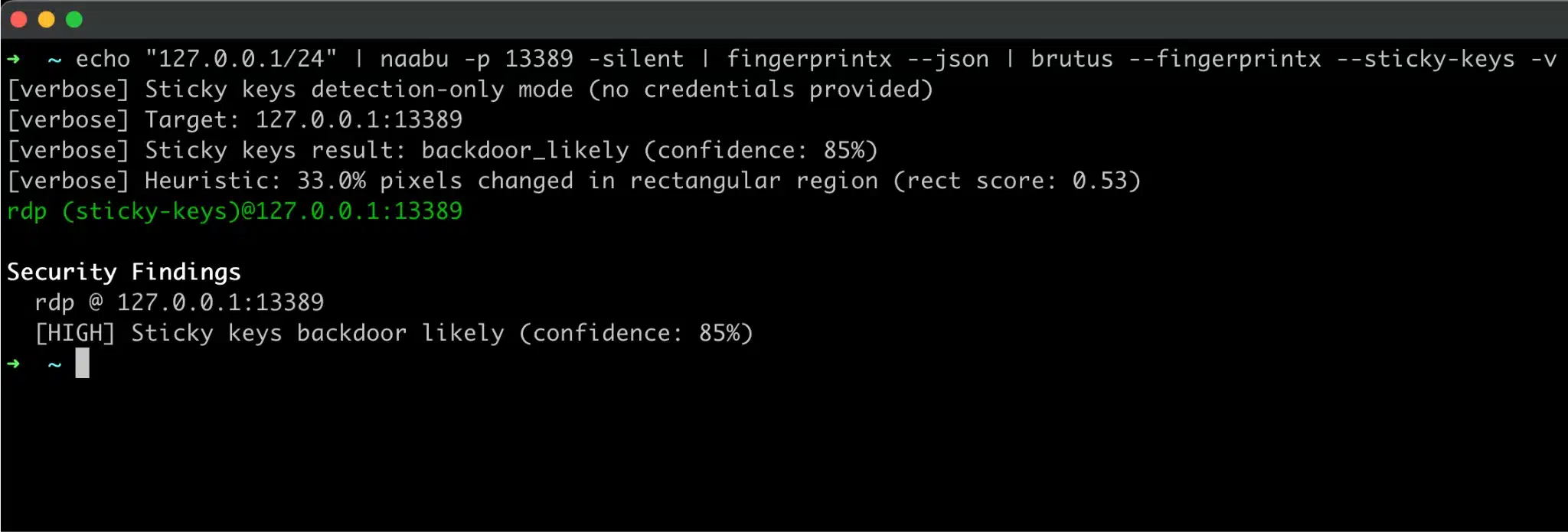
Our sticky keys detection mechanism also integrates natively with naabu and nerva (formerly fingerprintx) like the rest of Brutus to allow for pipelining and testing for this issue at scale:
Conclusion
Leveraging WebAssembly to run Rust code without CGO related dependencies turned out to be one of the more interesting architectural decisions in this project. If you’ve ever wished a Go tool could leverage a Rust or C library without taking on CGO’s baggage, the cross-compilation headaches, the broken static linking, the platform-specific build matrices, this approach is worth exploring.
The performance overhead for I/O-bound workloads like RDP is negligible, and the result is the same single statically-linked binary that Brutus has always been, just 5 MB heavier and several capabilities richer. RDP credential testing and sticky keys detection are both available now in the latest release from the Brutus GitHub repository, and the full implementation is under internal/plugins/rdp/ for anyone who wants to dig into the details.
If you were holding off on adopting Brutus because it didn’t support RDP, that reason just went away. If you’ve already been using it for other protocols, RDP slots in seamlessly with the same pipeline, output format, and workflow you’re already using. We’re excited to see what the community does with the sticky keys detection capability in particular, it’s the kind of check that should be running on every engagement, and now there’s no reason it can’t be.