TL;DR: Sulla is an open source SMB secret scanner for discovering credentials exposed in SMB shares across enterprise networks. It leverages our recently released Titus Go library, resulting in an easy-to-use, adaptable, and highly performant standalone binary.
Every network penetration tester knows the struggle: reviewing network shares for sensitive material is a painful must-do. With anything more than a handful of shares, manual review quickly becomes tedious if not outright infeasible. But automated secret scanning solutions produce nearly unworkable quantities of output, with actual secrets few and far between, not to mention requiring a Windows attack box.
Sulla solves this issue by combining Praetorian’s years of secrets detection innovation with a clean, user-friendly interface purpose-built for internal networks. The result is a focused SMB secret scanner that pentesters can run from any Linux box and trust to surface high-signal findings.
Sulla is also integrated end-to-end in the Guard, Praetorian’s all-in-one Continuous Threat Exposure Management platform, ensuring SMB secrets are identified as they appear in your environment.
How Sulla Scans SMB Shares for Secrets
Sulla automatically discovers readable SMB shares, traverses their file trees, and scans their contents for secrets using Titus. While Sulla ships with a robust set of default filters for file names, types, and locations, users have full control over the underlying matching logic and performance settings.
We wrote Sulla with special attention towards usability: useful output is produced immediately and written in real-time, enabling users to begin structured triage before scanning has even concluded. Sulla supports both human-readable and machine-digestible output formats, facilitating manual review and automated reporting pipelines.
This all flows into a four-stage operation: domain discovery, share filtering, content scanning, and structured output.
Stage 1: SMB Domain Discovery
Given domain credentials and a domain name, Sulla bootstraps the discovery pipeline:
sulla -u alice -p 'P@ssword' -d domain.tld -o results
Domain controllers are automatically discovered via DNS SRV lookups, and then queried via LDAP for active machines. For each live computer, Sulla connects over SMB, enumerates shares, and checks read access.
One challenge unique to enterprise environments is Distributed File System (DFS) shares: the same physical share may appear in multiple locations, leading to duplicated scanning. Sulla queries Active Directory for DFS namespace configurations and deduplicates targets before scanning begins, saving testers time and reducing redundant SMB traffic.
Stage 2: Six-Layer SMB Share Filtering
Raw SMB enumeration across a large domain can surface millions of files. Before any content is read over the network, Sulla runs each candidate through six filtering layers: directory exclusion (skipping Windows, System32, node_modules, and the like), recursion depth and per-directory file caps, extension-based filtering, a configurable size limit, and binary detection.
By default, Sulla runs in quick mode, tuned to surface high-probability targets fast. Rather than only excluding known-bad extensions, quick mode allowlists known-good filenames (id_rsa), substrings (credentials), and extensions (.ps1), and applies tighter limits: recursion depth 5, 200 files per directory, and a 15-minute cap per share. We’ve found that quick mode can scan domains with nearly 10,000 computer objects in as fast as 30 minutes, while still unearthing highly valuable secrets.
When you need exhaustive coverage, --full inverts this logic: it disables the allowlist and the tighter limits, scanning every file that isn’t caught by the default exclusions. Full scans run considerably longer and are best reserved for a single share or a focused follow-up rather than an entire domain.
Stage 3: Content Scanning with Titus
Titus is compiled directly into the Sulla binary. Each file that passes the filtering layers is read over SMB and scanned in-memory against Titus’s detection rules, which cover:
- Cloud providers: AWS access keys, GCP service account keys, Azure connection strings
- Version control & CI/CD: GitHub tokens, GitLab tokens, Jenkins credentials
- Databases: PostgreSQL, MySQL, MongoDB connection strings
- SaaS platforms: Stripe, Twilio, SendGrid, Slack, Datadog API keys
- Cryptographic material: RSA/DSA/EC private keys, PGP private keys
- Infrastructure: SSH keys, SNMP community strings, WPA PSK values
Stage 4: Structured Output and Triage
Findings are tagged with severity levels (Critical, High, Medium, Low) and written in the requested format. Sulla supports txt for quick review, json and jsonl for programmatic processing and log ingestion, sarif for security tool integration (DefectDojo, GitHub Advanced Security), and tabularium for the Guard platform integration.
When writing output, Sulla also generates an interesting_exclusions.csv file. This includes files that matched high-value indicators (keywords, quick-mode patterns) but were ultimately skipped due to binary detection or size limits, giving operators visibility into what might be worth revisiting with targeted extraction. For us, manually pulling a flagged .bak file from that list has turned a clean report into domain admin.
Sulla Quick Start
Sulla ships as a single static binary (and as a Docker image):
wget -O sulla https://github.com/praetorian-inc/Sulla/releases/latest/download/sulla-linux-amd64
chmod +x sulla
We recommend starting with a basic scan to identify actionable secrets and problematic shares early:
sulla -u alice -p 'P@ssword' -d domain.tld -o results -of txt,json
As the scan progresses, discovered shares, identified secrets, and interesting excluded paths will be written to your output directory:
results/
domain_tld_discovered_shares.txt
interesting_exclusions.txt
host1_domain_tld__MyShare.txt
host1_domain_tld__MyShare.json
If secrets are discovered, each share gets its own output file, simplifying triage.
Sulla in Action
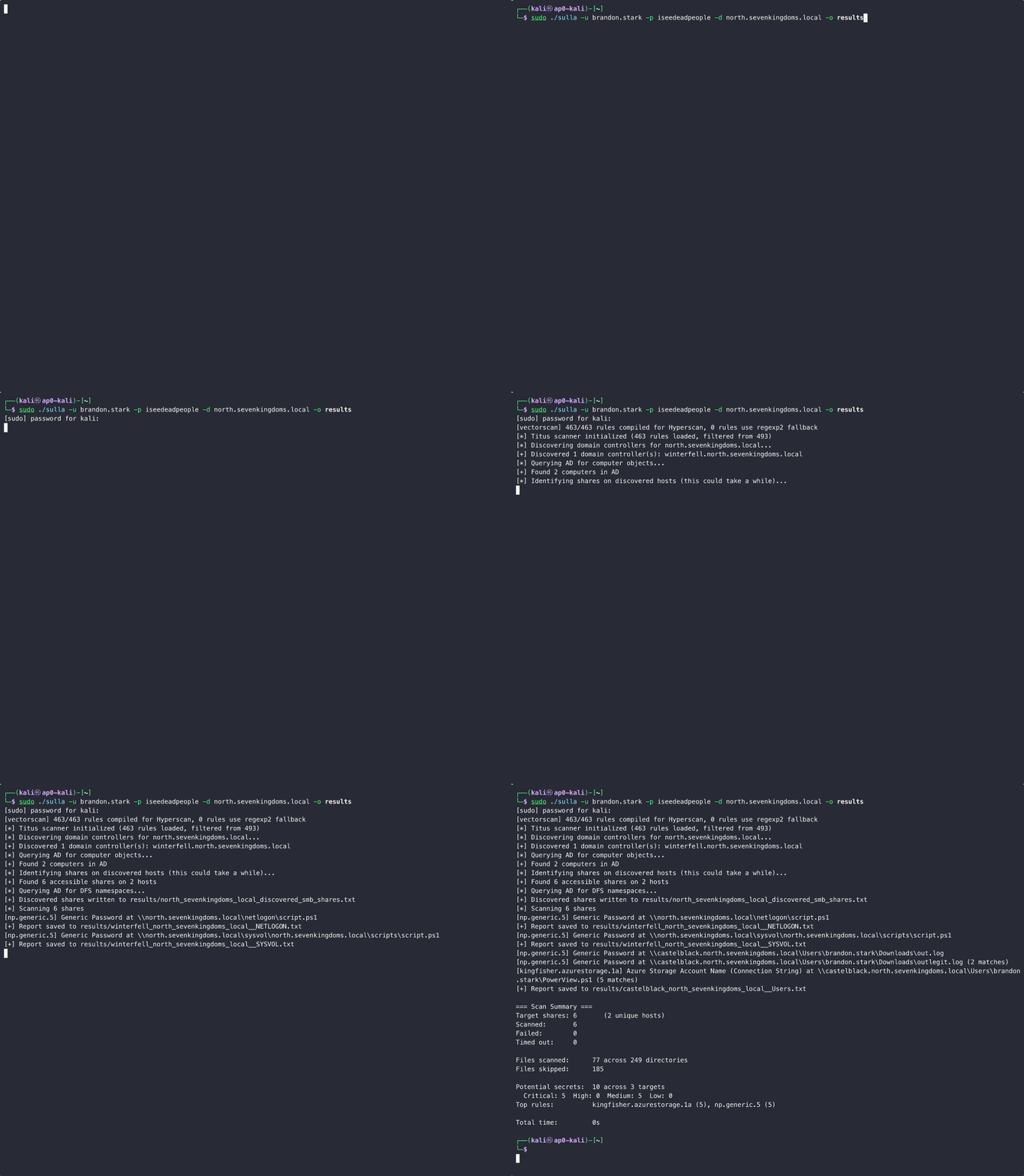
Sulla can be run as a standalone binary or as a Docker image. The demo below showcases binary usage:
Continuous SMB Secret Scanning with the Guard
For Guard customers, Sulla scans run automatically against enrolled AD domains on a weekly cadence. Findings are deduplicated across runs, so only newly discovered secrets surface for triage, turning a point-in-time scan into continuous SMB exposure monitoring.
Credential Spraying with Brutus
Passwords, certificates, or other credentials you discover with Sulla can be passed to Brutus, our credential spraying tool. Brutus takes a set of credentials and sprays them across an entire network infrastructure targeting a variety of protocols like SSH, RDP, SMB, database protocols, and more. Just double check that your sysadmin won’t mind some extra authentication logs first.
Get Started with Sulla
Sulla is available now at github.com/praetorian-inc/Sulla. Prebuilt binaries and Docker images are on the Releases page.
If you find bugs, want to contribute detection rules, or have feature requests, open an issue. We’re actively developing Sulla and want to hear how it performs on your engagements.
Want to see what continuous SMB secret scanning looks like across your environment? Request a Guard demo at https://www.praetorian.com/praetorian-guard-demo/ to see Sulla integrated into a continuous threat exposure management workflow.
Frequently Asked Questions
What is Sulla?
Sulla is an open source SMB secret scanner that discovers credentials exposed in SMB shares across enterprise networks. It uses Praetorian’s Titus detection library to identify cloud credentials, API keys, SSH keys, and other secrets in network shares, and ships as a single Linux binary or Docker image.
How does SMB secret scanning work with Sulla?
Sulla runs a four-stage pipeline: it discovers domain controllers via DNS SRV lookups, enumerates SMB shares on live computers, filters candidate files through six layers (directory exclusion, depth caps, extension filters, size limits, binary detection), and scans matching files in-memory against Titus detection rules. Findings stream to disk in real time so triage can begin before the scan completes.
What types of secrets does Sulla detect in SMB shares?
Sulla detects cloud provider credentials (AWS, GCP, Azure), version control and CI/CD tokens (GitHub, GitLab, Jenkins), database connection strings (PostgreSQL, MySQL, MongoDB), SaaS API keys (Stripe, Twilio, SendGrid, Slack, Datadog), cryptographic material (RSA/DSA/EC and PGP private keys), and infrastructure secrets (SSH keys, SNMP community strings, WPA PSK values).
How is Sulla different from other SMB secret scanners?
Most SMB secret scanners require a Windows attack box and produce overwhelming output volume with low signal. Sulla supports both Windows and Linux, applies six-layer filtering before reading file contents over the network, deduplicates DFS namespaces, and writes structured output in real time.
Is Sulla free and open source?
Yes. Sulla is free and open source, available at github.com/praetorian-inc/Sulla under the project’s open source license. Prebuilt binaries and Docker images are published on the Releases page, and contributions for detection rules and features are welcome.
Can Sulla integrate with continuous threat exposure management?
Yes. Sulla is integrated end-to-end in the Guard, Praetorian’s continuous threat exposure management platform. Scans run automatically against enrolled Active Directory domains on a regular cadence, findings are deduplicated across runs, and only newly discovered SMB secrets surface for triage.