
It’s day three of staring at a spreadsheet of 700,000 live hosts. Your port scans are done. Fingerprintx has identified thousands of SSH services, databases, admin panels, and file shares across a sprawling enterprise network. Now comes the part that every penetration tester hates: auditing and testing credentials at scale.
You need to check for default credentials on newly provisioned infrastructure. You need to validate passwords recovered from a compromised system against services across the network. You need to take that private key you pulled off a vulnerability scanner and figure out exactly where it grants access. And you need to do all of this efficiently, reliably, and in a way that produces clean output you can actually use.
This is why we built Brutus, a modern, multi-protocol credential testing tool written in Go with a plugin-based architecture within a single binary.
The Pain of Credential Testing Today
If you’ve spent any time doing red team work or internal security assessments, you’ve almost certainly reached for THC Hydra at some point. It’s been the go-to credential testing tool for years, and for good reason: it supports a ton of protocols and it works. But “it works” comes with a long list of asterisks.
Every engagement seems to start the same way. You’re on a jump box or spinning up a container, and the first thing you do is try to get Hydra compiled. You need libssh-dev for SSH support. You need libmysqlclient-dev for MySQL. Half the time the package versions don’t line up, or you’re on a stripped-down system that doesn’t have the development headers you need. You burn an hour getting your tools set up before you’ve tested a single credential.
Then there’s the output problem. Hydra’s output is designed for humans reading a terminal, not for machines processing results. When you’re dealing with thousands of hosts and you need to feed results into the next step of your workflow, whether that’s a report, a database, or another tool, you end up writing parsing scripts. Every time.
The pipeline problem compounds everything. Modern reconnaissance workflows are built around tools like naabu for port scanning and fingerprintx for service identification, tools that speak JSON and chain together cleanly. Hydra doesn’t fit into that world. You end up writing glue scripts to translate between formats, and those scripts become their own maintenance burden.
Brutus was built to eliminate all of this friction. It’s a single binary with zero external dependencies, just download and run it. It speaks JSON natively and integrates directly with fingerprintx and naabu. No more dependency management hell or formatting issues. Just pipe your reconnaissance output straight into credential testing and get structured results back.
Once Brutus has finished, you have a structured JSON file containing every valid credential discovered across the entire environment. You can query it, filter it, feed it into your reporting pipeline, or use it to plan your next moves, all without writing a single parsing script.
Auditing for Known-Compromised SSH Keys
Here’s a scenario that comes up more often than you’d think: somewhere in a large environment, someone has deployed infrastructure using a known-compromised SSH key. Maybe it’s a Vagrant box that was “temporarily” stood up and never torn down. Maybe it’s an F5 BIG-IP appliance running a factory key that was never rotated. Maybe it’s an ExaGrid backup appliance with its well-documented backdoor key.
The security community has already catalogued these publicly known keys, but testing all of them without missing a host or key is obnoxious with the current public tooling. Traditionally, you’d need to track down the key collections yourself, write a script to iterate through them, manage the key files on disk, and handle all the SSH connection logic. It’s not hard work, it’s just tedious enough that it often gets deprioritized or done incompletely.
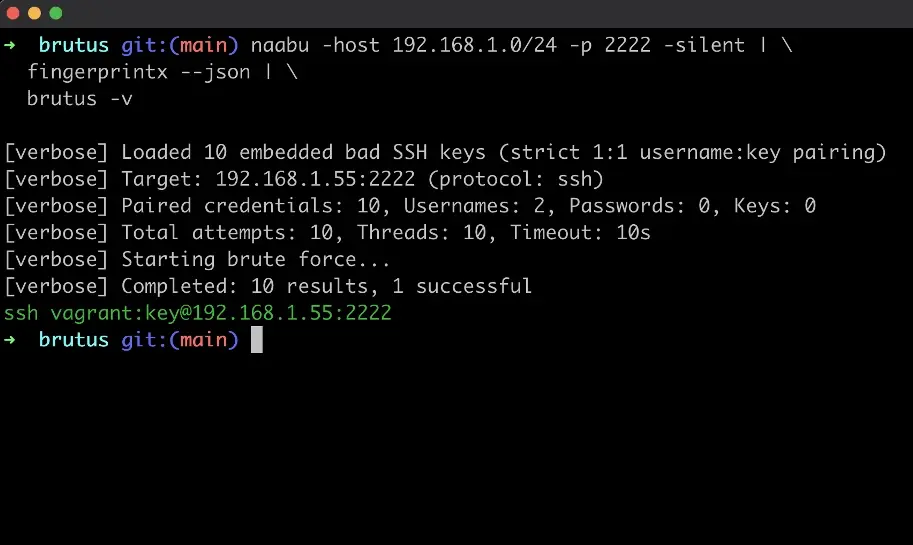
Brutus takes a different approach. It takes known bad key collections from Rapid7’s ssh-badkeys repository and HashiCorp’s Vagrant, and compiles them directly into the binary. When Brutus encounters an SSH service, it automatically tests every embedded bad key against the target. No key files to manage, no wrapper scripts to maintain, no chance of forgetting to include a key collection.
Each embedded key is paired with its expected default username (root for F5, vagrant for Vagrant, mateidu for Ceragon FibeAir, and so on), and the tool preserves that key context in the output. This means your results don’t just tell you “this key worked”, they tell you which known vulnerability you’ve identified, which is exactly what you need for compliance reporting and remediation guidance.
Spraying a Compromised Private Key
Finding a private key on a compromised system is one of those moments during an engagement where everything opens up, if you can figure out where the key works. Figuring that out is often harder than it sounds, especially in segmented environments.
On one engagement, we compromised virtual machines running Nessus vulnerability scanners. Each scanner had its own SSH private key that it used to authenticate to the hosts it was responsible for scanning. But the environment was segmented: different scanners covered different network zones, and each scanner’s key only granted access to hosts within its assigned scope.
This created an interesting operational challenge. We had multiple private keys from multiple compromised scanners, and we needed to map out exactly which key unlocked which hosts across which network segments. This wasn’t a situation where you could just spray one key everywhere and call it done. We needed to be methodical: take each key, test it against the appropriate target range, and build a clear picture of the access each key provided.
Without the right tooling, this turns into a soul-draining punishment in bash scripting. You’re writing loops, managing SSH connection timeouts, parsing output, and trying to keep track of which key you’re testing against which hosts. It works, but it’s slow, fragile, and painful to repeat when you compromise the next scanner.
With Brutus, this becomes a repeatable, clean workflow:
naabu -host 10.1.0.0/24 -p 22 -silent | \ fingerprintx --json | \ brutus -u nessus -k /path/to/scanner1_key
Each scanner compromise follows the same pipeline. Different keys, different target range, same workflow. The JSON output makes it straightforward to compare access across scanners, identify overlapping access, and map out lateral movement opportunities across the segmented environment.
This pattern extends well beyond Nessus scanners. Any time you recover a private key, from an automation server, a deployment pipeline, or a backup system, the question is the same: where does this key work? Brutus makes answering that question fast and repeatable.
Experimental: AI-Powered Credential Discovery
One of the more frustrating moments during an assessment is landing on an HTTP admin panel and having no idea what you’re looking at. You’ve got a login page. Maybe there’s a logo, maybe there’s a version string buried in the footer, maybe it’s completely generic. You know there’s probably a set of default credentials for whatever this appliance or application is, but you’d need to identify the product first, then go searching for its documentation or vendor defaults.
This happens constantly on internal assessments. You scan a network and find dozens of web services on non-standard ports: management interfaces for switches, storage appliances, monitoring tools, IoT devices, custom internal applications. Each one potentially has default credentials, but the manual process of screenshotting, identifying, researching, and testing is painfully slow when you’re dealing with them at volume.
We’ve been experimenting with using large language models to automate this identification and credential suggestion workflow, and while the features are still experimental, the early results are promising enough that we’ve included them in Brutus.
LLM-Powered Credential Suggestions
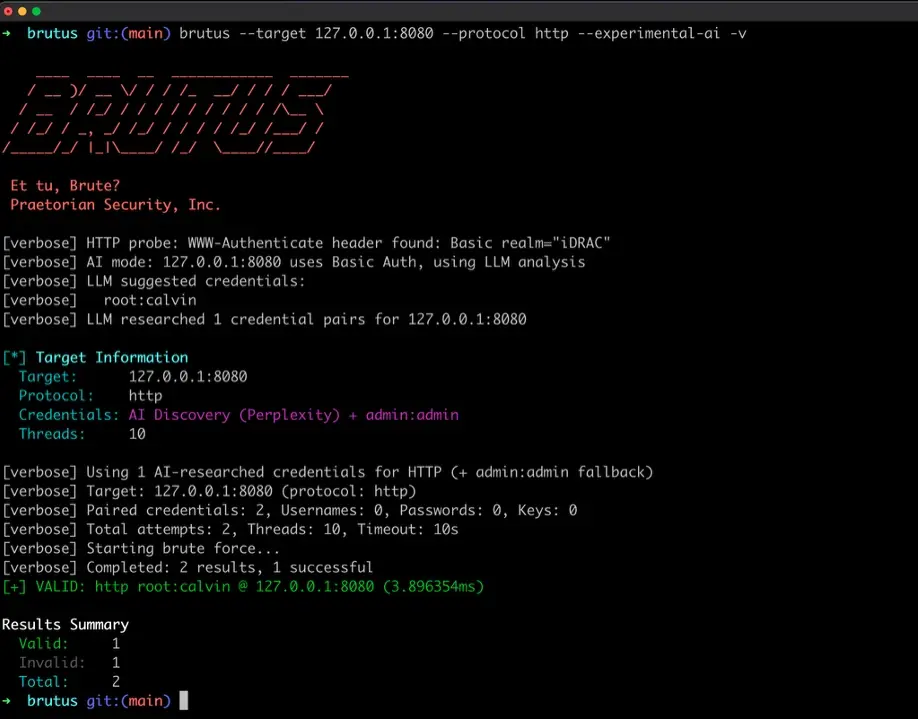
The first feature uses an LLM to analyze HTTP responses and suggest service-specific default credentials. When Brutus encounters an HTTP service, it can capture the response data, headers, page content, and server signatures, then send it to an LLM for analysis. The model identifies the application (Grafana, Jenkins, Tomcat, a Cisco management interface, whatever it might be) and suggests the vendor-specific default credentials for that product.
This turns what would normally be a manual research step, “what is this login page and what are its defaults?”, into an automated part of the pipeline. The LLM suggestions are tested first, and Brutus falls back to generic wordlists if they don’t succeed.
AI-Powered Browser Authentication
The second feature goes further. Some login pages aren’t simple HTTP Basic Auth; they’re JavaScript-rendered forms with CSRF tokens, multi-step workflows, or non-standard field names that break traditional form-filling tools. Brutus’s browser plugin uses headless Chrome combined with LLM vision analysis to handle these cases.
The workflow is conceptually simple: Brutus navigates to the page with headless Chrome, takes a screenshot, sends it to Claude’s vision API to identify what the page is and what kind of device or application it belongs to, then researches the appropriate default credentials and fills in the form. It compares the page state before and after submission to determine whether authentication succeeded.
This is particularly useful for the kinds of appliance management interfaces you encounter on internal assessments: routers, switches, UPS systems, IPMI interfaces, printer admin panels, where the login page is often the only clue to what you’re dealing with.
A Note on These Features
To be transparent: these AI features are experimental. They work well in the scenarios we’ve tested them against, but they depend on external API services, they add latency and cost to the testing workflow, and LLMs are inherently non-deterministic. We’re continuing to refine these capabilities and they may change significantly in future releases.
Community Contributions
Brutus is open source and we’re actively looking for contributions from the security community. The plugin-based architecture makes it straightforward to extend the tool in several directions. New protocol plugins are probably the highest-impact contribution. If there’s a service you find yourself testing credentials against on engagements that Brutus doesn’t support yet, the plugin interface makes it relatively simple to add. Each protocol is self-contained: implement the authentication logic, register it with the plugin system, and it’s immediately available in the pipeline.
Additional bad key collections are another area where community knowledge can make a real difference. If you’ve encountered embedded or default SSH keys in appliances, IoT devices, or vendor products that aren’t in the current collection, adding them means every Brutus user benefits from that discovery.
We also welcome bug reports, feature requests, and real-world usage feedback. The tool has been battle-tested on our own engagements, but every environment is different, and the more diverse the testing, the more robust the tool becomes. Check out the Brutus GitHub repository to get started, review the contribution guide, or spin up the demo lab for hands-on testing.
About the Name
If you’re familiar with Praetorian’s tooling, you’ll notice our projects tend to carry the names of Roman emperors like Trajan and Augustus. Brutus breaks that tradition, because Marcus Junius Brutus was never an emperor. He’s remembered for something else entirely: walking into the Roman Senate on the Ides of March and putting a dagger in the back of the most powerful man in the world.
That felt more appropriate for a credential testing tool than any emperor’s name ever could. Brutus doesn’t build empires; it tests whether the ones you’ve built will let a stranger walk right through the front door. And like its namesake, it’s most dangerous to the systems that trust it implicitly.
Besides, “Et tu, default creds?” was too good to pass up.
Conclusion
Credential testing is one of those fundamental tasks in offensive security that should be simple but rarely is. Between dependency management, inconsistent tooling, format conversion scripts, and manual workflows that don’t scale, what should be a straightforward step in an assessment often becomes a time sink.
The next time you’re three days into an engagement, staring at thousands of discovered services across a massive network, or holding a private key from a compromised scanner and wondering where it works, you won’t need a bash for-loop and three hours of patience. You’ll need one binary and one pipeline.
Give Brutus a try. We think it’ll change how you approach credential testing on your next engagement.
Brutus is one piece of how we approach offensive security at Praetorian. To see how we automate credential testing and attack surface management across enterprise environments at scale, take a look at the Praetorian Guard platform.
Frequently Asked Questions
What is Brutus?
Brutus is an open-source, multi-protocol credential testing tool written in Go. It ships as a single binary with zero external dependencies and is designed for penetration testers and red teams who need to audit default credentials, test recovered passwords, and spray SSH keys across large environments. It outputs structured JSON and integrates directly with reconnaissance tools like naabu and fingerprintx.
How is Brutus different from THC Hydra?
Brutus is a single binary with no compilation dependencies, so there’s no wrestling with libssh-dev, libmysqlclient-dev, or missing headers. It speaks JSON natively for pipeline integration, ships with compiled-in known-bad SSH key collections, and includes experimental AI-powered credential discovery for identifying unknown admin panels. Hydra remains a capable tool, but Brutus is built for modern JSON-based offensive workflows.
What protocols does Brutus support?
Brutus supports a lot of protocols out of the box: Network Services (5): SSH, FTP, Telnet, VNC, SNMP Web Services (2): HTTP, HTTPS Enterprise Infrastructure (3): SMB, LDAP, WinRM Databases (10): MySQL, PostgreSQL, MSSQL, MongoDB, Redis, Neo4j, Cassandra, CouchDB, Elasticsearch, InfluxDB Communications (3): SMTP, IMAP, POP3
How does Brutus test for compromised SSH keys?
Brutus compiles known-bad SSH key collections from Rapid7’s ssh-badkeys repository and HashiCorp’s Vagrant directly into the binary. When it encounters an SSH service, it automatically tests every embedded key. Each key is paired with its expected default username, so results tell you exactly which known vulnerability was identified.
What are Brutus’s AI-powered credential features?
Brutus includes two experimental AI features. The first uses an LLM to analyze HTTP responses and suggest vendor-specific default credentials for identified applications. The second uses headless Chrome with Claude’s vision API to navigate JavaScript-rendered login pages, identify the device, research credentials, and authenticate automatically. Both features are experimental and depend on external API services.
Is Brutus open source? How can I contribute?
Yes. Brutus is fully open source under the Praetorian GitHub organization. High-impact contributions include new protocol plugins, additional bad SSH key collections, bug reports, and real-world usage feedback. The repository includes a contribution guide and a demo lab for hands-on testing.