
TL;DR: Titus is an open source secret scanner from Praetorian that detects and validates leaked credentials across source code, binary files, and HTTP traffic. It ships with 450+ detection rules and runs as a CLI, Go library, Burp Suite extension, or Chrome browser extension — putting secrets detection everywhere you already work during engagements.
Say you find yourself in the second week of a red team engagement. You have a foothold, and now it’s time to start pivoting around. You’ve got a hundred repositories cloned to your laptop, another fifty you’re still enumerating from the org’s GitHub, and you’re already eight Burp Repeater tabs deep into their internal web portal. Somewhere in that pile of code and HTTP responses is a hardcoded AWS key, a Stripe secret, or an internal service token that nobody rotated after the last contractor left. There’s always SOMETHING, it’s just a matter of time.
Titus exists to help reduce that time along with the number of secrets you miss along the way.
It’s a secret scanner that runs as a CLI, a Go library, a Burp Suite extension, or a Chrome browser extension all sharing the same detection engine and rule set. Scan a directory of cloned repos from the terminal. Scan HTTP responses passively while you browse through Burp. Scan JavaScript as you click through their web app.
In some cases, you don’t change your workflow at all. You just find secrets for free.
From Nosey Parker to Titus: Why We Built a New Secret Scanner
Titus isn’t the first secret scanner we’ve built. Back in 2022 we released Nosey Parker, an AI-augmented secrets scanner that combined regex-based detection with a machine learning denoiser trained on real engagement data. It was fast, up to 100x faster than common alternatives at the time, and the ML layer gave it a meaningfully higher signal-to-noise ratio than pure-regex tools.
We continued developing Nosey Parker over the following years. The ML pipeline matured, the rule set grew, and we scaled it to process tens of terabytes of source code and git history on modest hardware. It became a core part of our engagement toolkit.
But Nosey Parker was written in Rust, and while Rust is great for raw performance, it created friction when we wanted to integrate the scanner into other tools in our ecosystem that are overwhelmingly written in Go. Embedding a Rust binary as a subprocess works, but it’s not the same as calling a function. We wanted scanner.ScanString(content), not exec.Command("noseyparker", "scan", "--stdin").
So we ported it. Titus is a Go implementation of the same detection engine, carrying forward Nosey Parker’s battle-tested rules and adding capabilities that only make sense when the scanner lives in the same language as everything around it.
What’s New in Titus
Secrets Validation: Are Your Detected Credentials Actually Live?
The feature we’re most excited about is validation. Titus can check whether a detected secret is actually live by making a controlled request against the relevant API.
The validation framework uses a simple templating system. Each rule can optionally define a validator which is just a small YAML block specifying an HTTP request to make with the captured secret and how to interpret the response. If the API returns a 200, the key is live. If it returns a 401 or 403, it’s been revoked. If the endpoint is unreachable, the finding is marked unknown.
titus scan path/to/code --validate
That’s it. The scanner runs its usual regex matching, then kicks off concurrent validation workers (4 by default, tunable with --validate-workers,) against any finding that has a validator defined. Each result gets tagged as confirmed, denied, or unknown.
This matters operationally. On larger engagements you might get hundreds of regex hits. Knowing which keys are live before you start writing your report or attempting lateral movement changes how you prioritize the rest of your time.
We’ve already implemented a healthy number of validators but this is one area we’ll be updating frequently in the coming weeks.
Binary File Secrets Extraction
Most secret scanners only look at plaintext. Titus can crack open binary file formats and scan their contents. Currently it supports Office documents (xlsx, docx, pptx), PDFs, Jupyter notebooks, SQLite databases, and just about every common archive format (zip, tar, tar.gz, jar, war, ear, apk, ipa, crx). Archives are recursively extracted up to configurable depth and size limits, so a zip-inside-a-zip still gets scanned. This matters more than you’d expect as we routinely find credentials in exported spreadsheets, embedded in Jupyter notebooks, or buried in mobile app packages that were shipped with a hardcoded API key.
titus scan path/to/files --extract=all
You can also target specific formats (--extract=xlsx,pdf,zip) if you want to keep scan times tight on large directories.
450+ Detection Rules Out of the Box
Titus ships with over 450 detection rules drawn from two sources. Roughly 200 rules come from Nosey Parker, covering the credential patterns we’ve seen most often across years of engagements such as AWS, GCP, Azure, GitHub tokens, Slack webhooks, database connection strings, and dozens more.
The remaining 250+ rules come from integrating Kingfisher, MongoDB’s NoseyParker fork. The Kingfisher team added detection patterns for a long tail of SaaS platforms and services that our original rule set didn’t cover like Stripe, Twilio, SendGrid, Datadog, and hundreds of others. Rather than duplicate their work, we pulled their rules directly into Titus and made both sets available in a single scanner.
We’ve kept the format for specifying rules identical to NoseyParker so it’s easy to continue pulling rules from other forks and vice versa. We’re not looking to lock anyone into using Titus if they prefer other tools.
The combined set covers cloud providers, CI/CD systems, payment processors, communication platforms, monitoring services, and more. If a service has an API key, there’s probably a rule for it. If not, they’re easy enough to add.
One Engine, Four Interfaces: CLI, Go Library, Burp Suite, and Chrome
The motivation for the Go rewrite wasn’t just integration cleanliness, it was about putting the scanner everywhere we already work.
CLI – The obvious one. Point it at a file, a directory, or a git repo and get results. SARIF output means it can pipe directly into other CI/CD pipelines.
titus scan --git path/to/repo --format sarif
Go Library – Import it into your own tools. This is what we use internally to embed secrets detection in our platform without shelling out to a subprocess.
scanner, _ := titus.NewScanner(titus.WithValidation())
matches, _ := scanner.ScanString(httpResponseBody)
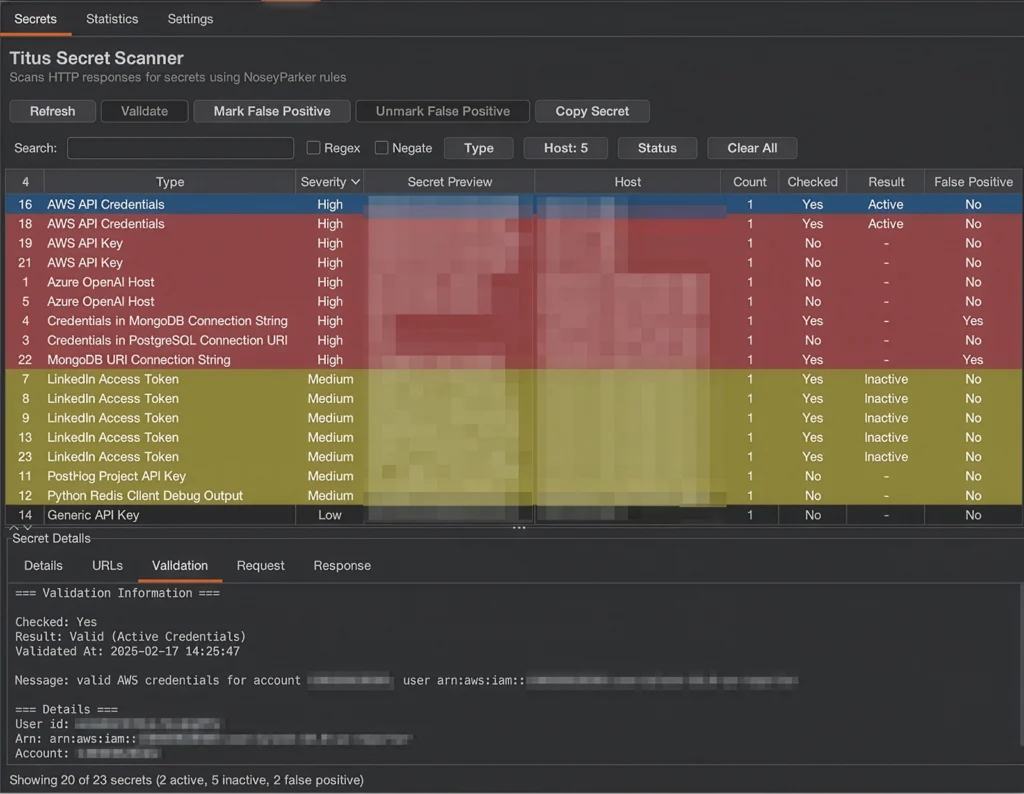
Burp Suite Extension – The Burp extension launches a titus serve process at startup and scans HTTP responses as they flow through the proxy. Passive scanning requires zero interaction, the scanner just runs in the background and reports findings. You browse and it finds secrets. You can also actively select requests to run or re-run the scanner against if you want to use this with an existing Burp project.
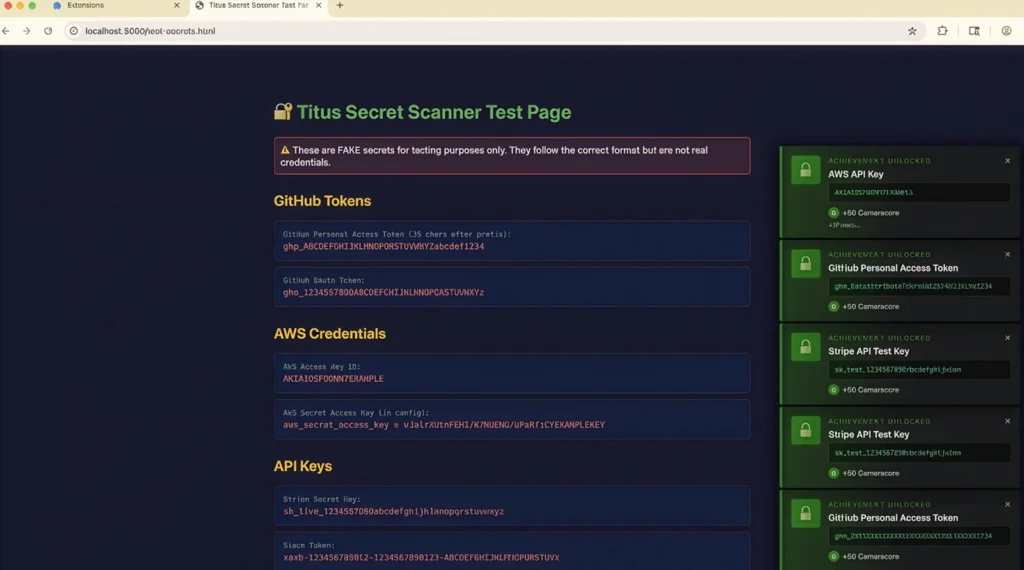
Chrome Extension – For web application assessments where you’re not running Burp, the browser extension scans JavaScript, stylesheets, localStorage, and sessionStorage as you navigate. It uses the same underlying engine and ruleset, just compiled to WASM. One of the authors of this project absolutely loves Chrome Extensions so he insisted. We (don’t) apologize for the fact that it pops up an Xbox-style achievement every time it finds a secret. This is handy in assumed breach contexts where maybe you don’t have the ability to install Burp, but you have browser access to internal resources.
All four interfaces live in the same repository, share the same rule set, and ship from the same build. When we add a rule or fix a detection pattern, it propagates everywhere.
What to Do with Validated Secrets
Once you have a pile of validated secrets, the question becomes what to do with them. Two developments since the Nosey Parker days are worth calling out.
LLM-Assisted Denoising: Reducing False Positives
When we released Nosey Parker in 2022, using an LLM to triage findings would have been a stretch. That’s obviously no longer the case. Regex-based scanners inevitably produce false positives due to test fixtures, or example configs, placeholder values that happen to match a pattern. The validation framework catches some of these (a test key won’t return a 200 from the AWS STS API), but not all.
A straightforward denoising step is to feed each finding’s context, a few lines before and after the match, into an LLM and ask whether it looks like a real credential or a false positive. In our internal testing, this eliminates a significant chunk of noise with minimal effort. We’re still thinking about how to ship this officially and will likely add a --llm-denoise flag that works with major LLM providers in the near future.
Credential Spraying with Brutus
If your findings include passwords, certificates, or other reusable credentials, you can feed them directly into Brutus, our recently released credential spraying tool. Brutus takes a set of credentials and sprays them across an entire network infrastructure targeting a variety of protocols like SSH, RDP, SMB, database protocols, and more. If you happen to have found a sysadmin’s favorite password to re-use, this tool is going to open a lot of doors for you.
The workflow is natural: Titus finds the credentials, Brutus tests them at scale. Both of these tools are just part of a suite we’re releasing over the coming weeks. Keep an eye out for further tool drops that will provide other interesting ways to chain secrets discovery or brute forcing into material risks.
Titus is available now at https://github.com/praetorian-inc/titus. Prebuilt binaries for Linux, macOS, and Windows are on the Releases page. The Burp extension JAR and Chrome extension ship alongside them.
If you find bugs, want to contribute rules, or have feature requests, open an issue. We’re actively developing Titus and want to hear how you’re using it.
Frequently Asked Questions
What is Titus?
Titus is an open source secret scanner built in Go by Praetorian. It detects leaked credentials, API keys, and tokens across source code, binary files, and HTTP traffic. It runs as a CLI tool, a Go library, a Burp Suite extension, or a Chrome browser extension, all sharing the same detection engine and rule set.
How many detection rules does Titus include?
Titus ships with over 450 detection rules drawn from two sources: roughly 200 rules from Nosey Parker covering credential patterns commonly found during security engagements, and 250+ rules from Kingfisher (MongoDB’s Nosey Parker fork) covering a long tail of SaaS platforms and services including Stripe, Twilio, SendGrid, Datadog, and more.
Can Titus validate whether detected secrets are live?
Yes. Titus can check whether a detected secret is actually live by making a controlled request against the relevant API. Run titus scan path/to/code –validate and each finding is tagged as confirmed, denied, or unknown. The scanner uses concurrent validation workers (4 by default, configurable with –validate-workers).
What file formats can Titus scan?
Beyond plaintext source code, Titus can extract and scan secrets from binary file formats including Office documents (xlsx, docx, pptx), PDFs, Jupyter notebooks, SQLite databases, and common archive formats (zip, tar, tar.gz, jar, war, ear, apk, ipa, crx). Archives are recursively extracted up to configurable depth and size limits.
How does Titus compare to Nosey Parker?
Titus is a Go reimplementation of Nosey Parker’s detection engine. Nosey Parker was written in Rust and offered excellent raw performance, but the Go rewrite enables native integration with Praetorian’s Go-based tooling ecosystem. Titus carries forward Nosey Parker’s battle-tested rules and adds new capabilities like secrets validation, binary file extraction, and a Burp Suite extension.
How do I install Titus?
Titus is available at github.com/praetorian-inc/titus. Prebuilt binaries for Linux, macOS, and Windows are on the Releases page. The Burp Suite extension JAR and Chrome extension ship alongside them.